
Agents

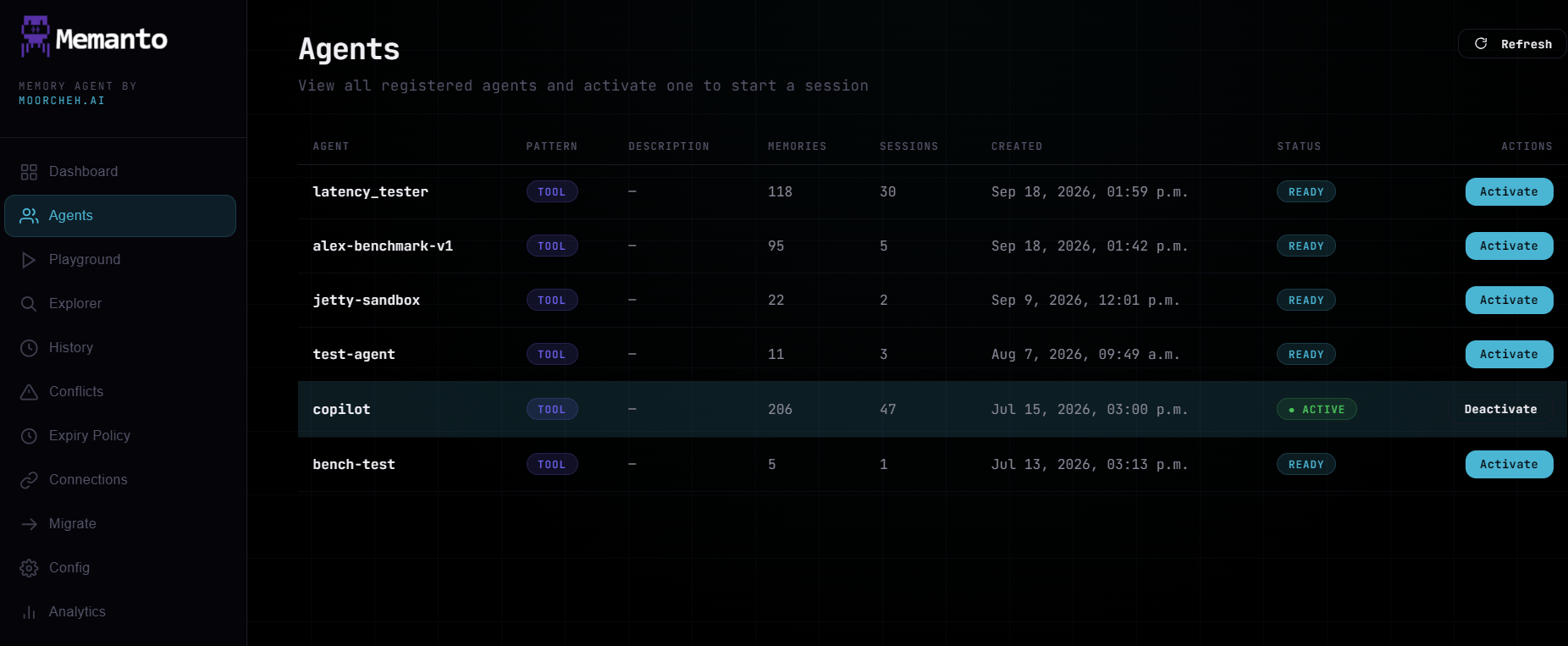
The Agents page allows you to view all registered agents in your workspace, create new ones, activate them, and delete them. Activating an agent sets it as the current context for sessions and memory operations. The main table displays all registered agents along with their metadata (memories, sessions, etc.), current readiness state, and quick actions to refresh the list or activate specific agents.
Creating an agent

Click New Agent to open the create form:
  • Agent ID — letters, numbers, hyphens, and underscores only.
  • Pattern — support, project, or tool. This labels how the agent’s memory is organized and doesn’t change functionality.
  • Description — optional.
The new agent is activated right after it’s created, the same as memanto agent create.

Deleting an agent

Each row has a Delete button that works like memanto agent delete. After you confirm, the UI asks whether to also delete the agent’s memories in Moorcheh:
  • Keep memories (default) — only the agent is removed. Its memory namespace stays in Moorcheh so you can reach it later.
  • Delete memories — the namespace is deleted too.
Deleting the active agent also ends its session.
Memanto agents page