

Memanto On-Prem
Memanto supports two backends:- Cloud (default) — Memanto talks to Moorcheh Cloud over the network with a
MOORCHEH_API_KEY. - On-Prem — Memanto talks to a local Moorcheh server running in Docker on your own machine or private network. No Moorcheh API key required.
memanto config backend on-prem). Service code never branches on backend — everything in this documentation works identically once you are configured.
When to Choose On-Prem
Pick Cloud instead if you want zero-install, sub-90ms hosted retrieval, and don’t need to keep data on-prem. See Moorcheh Setup & Integration for the cloud path.
Architecture
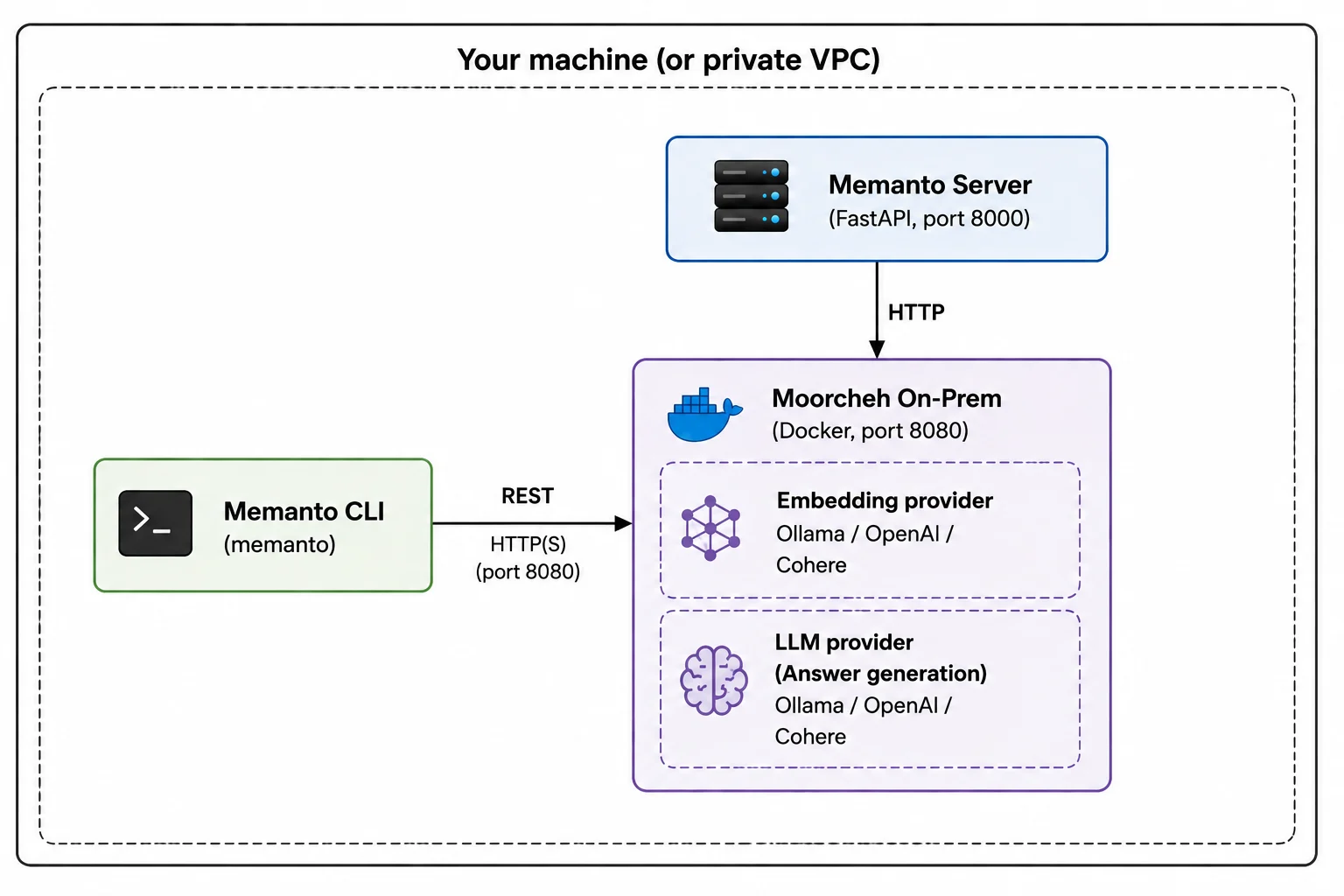
- Memanto CLI/Server — the same
memantobinary you’d use against the cloud. WithMEMANTO_BACKEND=on-prem, it routes Moorcheh calls to the local server athttp://localhost:8080instead of the cloud API. - Moorcheh on-prem server — a containerized build of Moorcheh started by the
moorcheh upcommand (shipped with themoorcheh-clientPython package). Exposes the samenamespaces / documents / similarity_search / answer / files / vectorsresource shape as the cloud SDK. - Embedding + LLM providers — Ollama (default, runs in a sibling container, zero API keys), or your own OpenAI / Cohere account.
What’s Included
Everything available in cloud mode is available on-prem:- All 13 typed memory types —
instruction,fact,decision,goal,commitment,preference,relationship,context,event,learning,observation,artifact,error. See Memory Types. remember/recall/answer— the same three primitives.answeruses your locally configured LLM provider instead of the cloud’s hosted model.- Temporal queries —
--as-of,--changed-since,--recent. See Temporal Memory. - Batch ingestion — up to 100 memories per request.
- File upload —
.pdf,.docx,.xlsx,.json,.txt,.csv,.md. Files are copied into~/.moorcheh/uploadsand made searchable by the on-prem indexer. - Sessions — same 6-hour JWT session model.
- Agent management — create, list, activate, deactivate, bootstrap.
- Daily summaries, conflict detection, scheduled runs —
memanto daily-summary,memanto conflicts,memanto schedule enable. - Web UI —
memanto uiworks against on-prem the same as cloud. - Integrations — Claude Code, Cursor, Codex, Windsurf, Gemini CLI, Cline, Continue, OpenCode, Goose, Roo, GitHub Copilot, Augment (via
memanto connect). - REST API — every endpoint under
/api/v2/agents/...works identically.
Isolation Guarantees
When you switch to on-prem, Memanto isolates your configuration so cloud and on-prem state never cross-contaminate:- Per-backend data directory: cloud uses
~/.memanto/, on-prem uses~/.memanto/on-prem/. Agents, sessions, and registry entries are separate. - Per-backend connection state: the on-prem server URL, embedding provider, and LLM model live in
~/.memanto/on-prem/state.json. The cloud’s~/.memanto/config.yamlis never touched by on-prem onboarding. - Per-backend session tokens: switching backends clears the active session so you don’t accidentally send a cloud token to the on-prem server (or vice versa).
memanto config backend cloud / memanto config backend on-prem. Your agents on each side remain intact.
Next Steps
- Check requirements → Requirements
- Install in 5–10 minutes → On-Prem Quickstart
- Tune embedding + LLM providers → Configuration
- Move between cloud and on-prem → Backend Switching
- Run Memanto’s REST server in production → Self-Hosting Memanto Server
- Ship to Kubernetes → Kubernetes Deployment