> ## Documentation Index
> Fetch the complete documentation index at: https://docs.memanto.ai/llms.txt
> Use this file to discover all available pages before exploring further.

# Migrations

> Manage memory store migrations and backups.

# Migrations

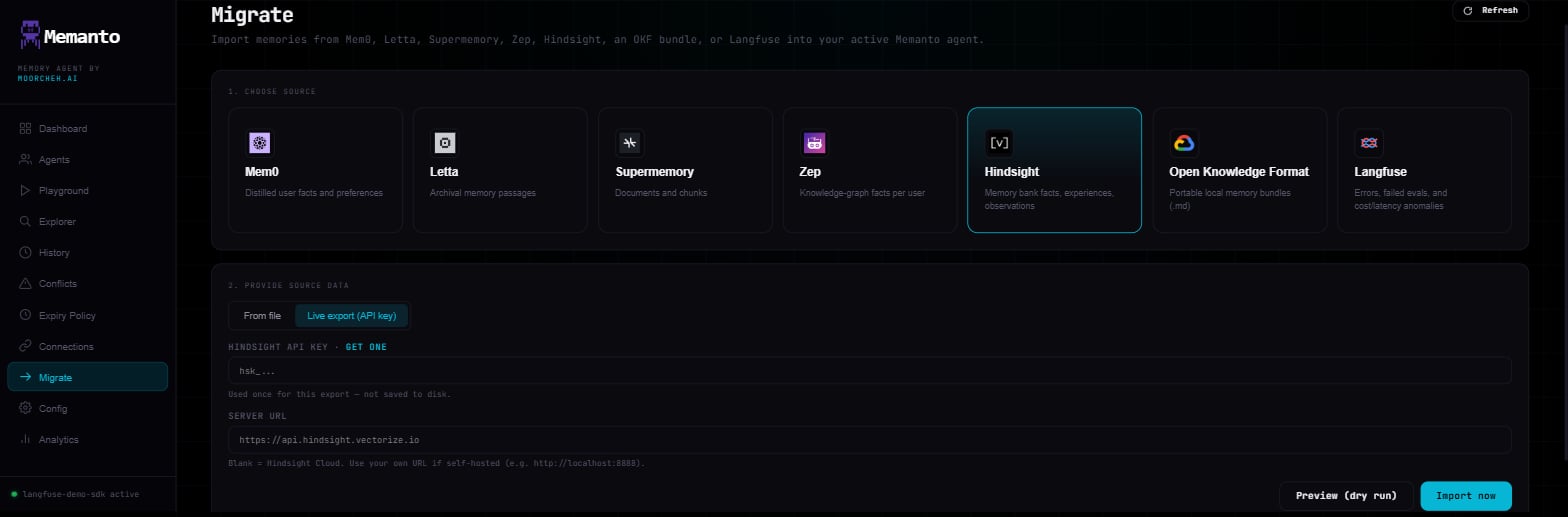
The Migrate page imports memories from another provider into the active agent
without using the CLI. It runs the same pipeline as
[`memanto migrate`](/cli/migrate/migrate).
<div style={{ position: "relative", width: "100%", maxWidth: "1568px", margin: "0 auto", marginBottom: "2rem" }}>
  <img src="https://mintcdn.com/memanto/_fs6Om8p43gXgaQ5/logo/cli/ui/migrate-page.png?fit=max&auto=format&n=_fs6Om8p43gXgaQ5&q=85&s=18589a0211666c2a59172ded1f41d59d" alt="Memanto migrate page with the Hindsight source selected" style={{ width: "100%", borderRadius: "12px", border: "1px solid #1f2937" }} width="1568" height="517" data-path="logo/cli/ui/migrate-page.png" />

  <div style={{ position: "absolute", top: "20%", left: "11%" }}><span style={{ background: "#0f766e", color: "#ffffff", borderRadius: "9999px", padding: "4px 9px", fontWeight: 700, fontSize: "12px" }}>1</span></div>
  <div style={{ position: "absolute", top: "57%", left: "11%" }}><span style={{ background: "#0f766e", color: "#ffffff", borderRadius: "9999px", padding: "4px 9px", fontWeight: 700, fontSize: "12px" }}>2</span></div>
  <div style={{ position: "absolute", top: "80%", left: "11%" }}><span style={{ background: "#0f766e", color: "#ffffff", borderRadius: "9999px", padding: "4px 9px", fontWeight: 700, fontSize: "12px" }}>3</span></div>
  <div style={{ position: "absolute", top: "88%", left: "78%" }}><span style={{ background: "#0f766e", color: "#ffffff", borderRadius: "9999px", padding: "4px 9px", fontWeight: 700, fontSize: "12px" }}>4</span></div>
</div>

1. **Choose source**: Mem0, Letta, Supermemory, Zep, Hindsight, an [OKF](/integrations/okf) bundle, or [Langfuse](/integrations/langfuse).
2. **From file / Live export**: Load an export file already on the server's disk, or pull a live export with the provider's API key. The key is used once and not saved.
3. **Server URL** (Hindsight only): Leave blank for Hindsight Cloud, or point it at a self-hosted server.
4. **Preview (dry run) / Import now**: Preview maps the records without writing. Import writes them into the active agent in batches of 100, and is disabled until an agent is active.

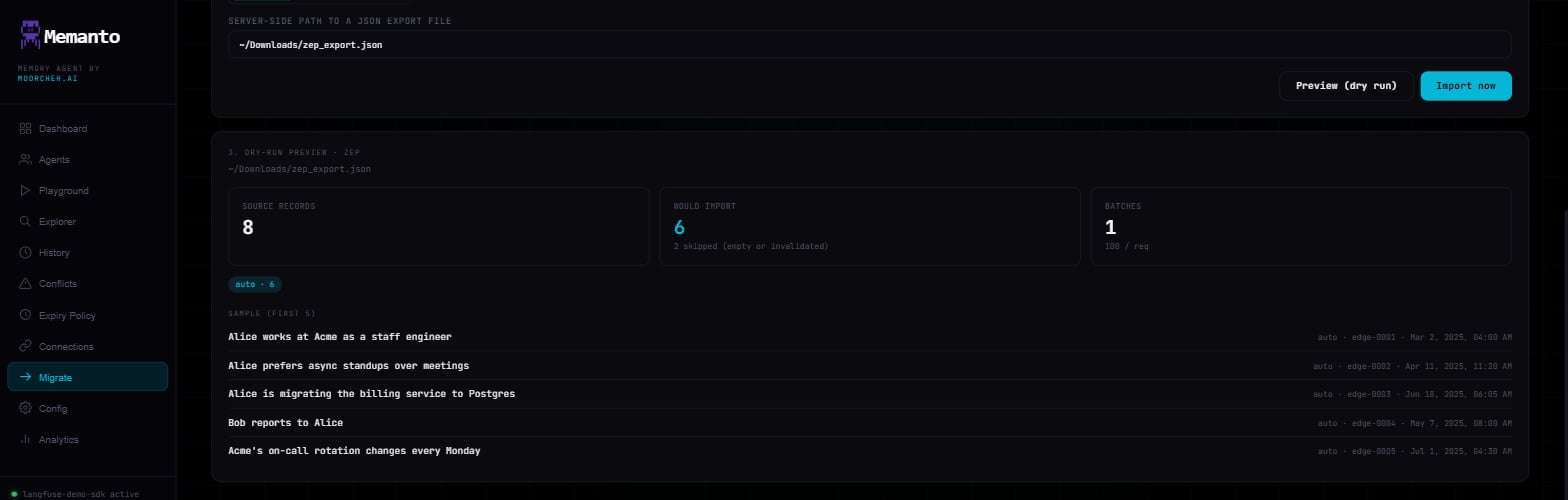
The preview shows how many source records were found, how many would be
imported, how many were skipped (empty, or invalidated at the source), the
per-type breakdown, and the first few mapped memories. Mem0, Letta, and
Supermemory previews also show savings tiles.
<div style={{ width: "100%", maxWidth: "1568px", margin: "0 auto" }}>
  <img src="https://mintcdn.com/memanto/_fs6Om8p43gXgaQ5/logo/cli/ui/migrate-preview-page.png?fit=max&auto=format&n=_fs6Om8p43gXgaQ5&q=85&s=867b1265f65afc6e5a2fa7ff69ed214e" alt="Memanto migrate dry-run preview for a Zep export" style={{ width: "100%", borderRadius: "12px", border: "1px solid #1f2937" }} width="1568" height="500" data-path="logo/cli/ui/migrate-preview-page.png" />
</div>
