> ## Documentation Index
> Fetch the complete documentation index at: https://docs.memanto.ai/llms.txt
> Use this file to discover all available pages before exploring further.

# Configuration

> Configure system settings, models, and limits.

# Configuration

Configure your Memanto environment directly from the UI.
<div style={{ position: "relative", width: "100%", maxWidth: "1413px", margin: "0 auto" }}>
  <img src="https://mintcdn.com/memanto/F_q9DVKuuTw1KDp7/logo/cli/ui/config-page-top.png?fit=max&auto=format&n=F_q9DVKuuTw1KDp7&q=85&s=6ac665427c4002e3a195236e49cb09ca" alt="Memanto configuration page top section" style={{ width: "100%", borderRadius: "12px", border: "1px solid #1f2937" }} width="1881" height="1093" data-path="logo/cli/ui/config-page-top.png" />

  <div style={{ position: "absolute", top: "11%", left: "36%" }}><span style={{ background: "#0f766e", color: "#ffffff", borderRadius: "9999px", padding: "4px 9px", fontWeight: 700, fontSize: "12px" }}>1</span></div>
  <div style={{ position: "absolute", top: "27%", left: "36%" }}><span style={{ background: "#0f766e", color: "#ffffff", borderRadius: "9999px", padding: "4px 9px", fontWeight: 700, fontSize: "12px" }}>2</span></div>
  <div style={{ position: "absolute", top: "74%", left: "46%" }}><span style={{ background: "#0f766e", color: "#ffffff", borderRadius: "9999px", padding: "4px 9px", fontWeight: 700, fontSize: "12px" }}>3</span></div>
  <div style={{ position: "absolute", top: "92%", left: "47%" }}><span style={{ background: "#0f766e", color: "#ffffff", borderRadius: "9999px", padding: "4px 9px", fontWeight: 700, fontSize: "12px" }}>4</span></div>
</div>

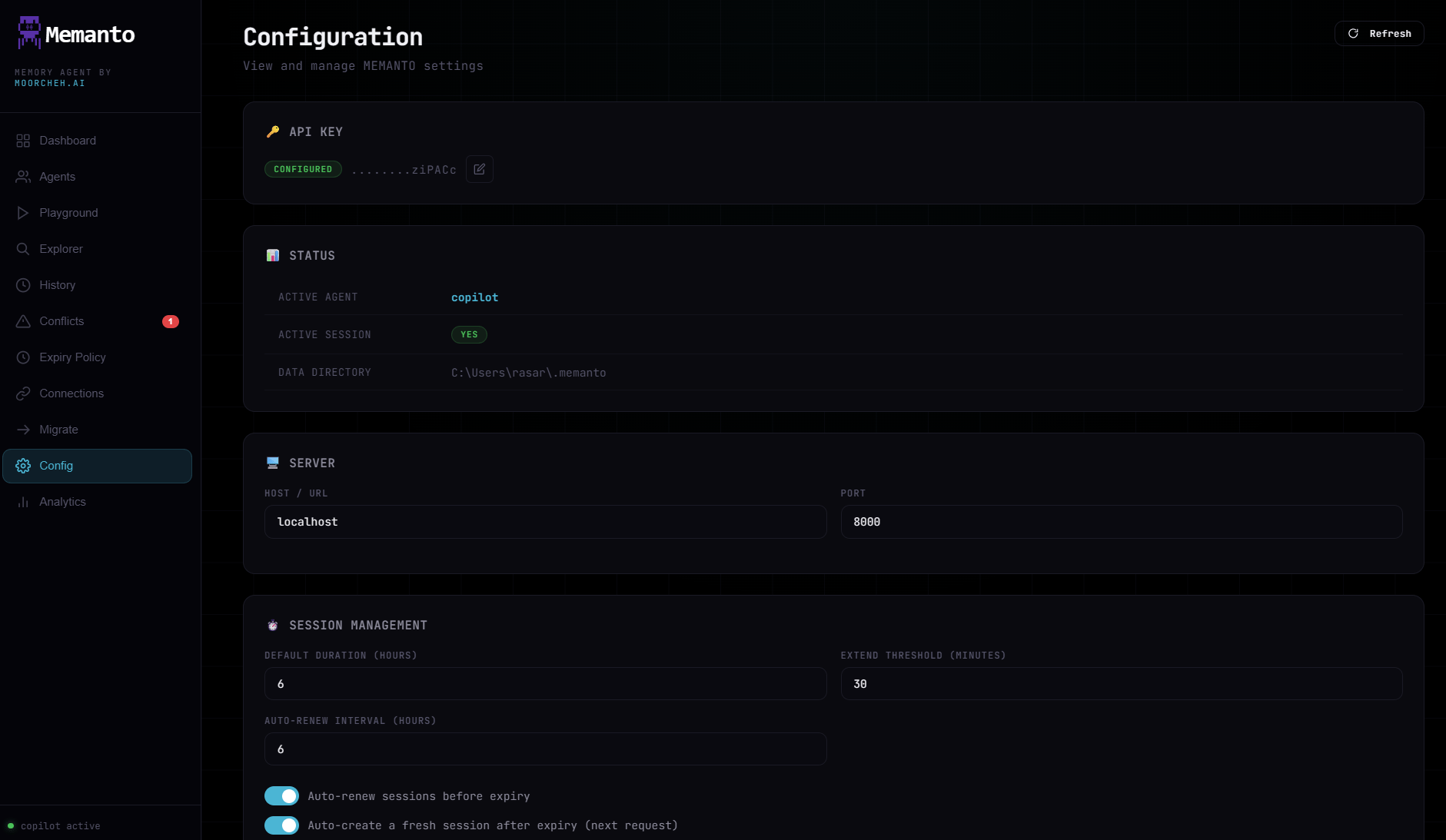
1. **API credentials state**: Confirms API key status and access mode.
2. **Active context**: Current active agent and session details.
3. **Connection settings**: Server host and port used by the dashboard.
4. **Session behavior**: Auto-renew and auto-recreate policies for sessions. Toggling either here applies to the running server immediately — no restart needed. For details on session lifecycles and expiration, see [Session Management](/guides/session-management).

## Answer, Limits, and Schedule
<div style={{ position: "relative", width: "100%", maxWidth: "1395px", margin: "0 auto" }}>
  <img src="https://mintcdn.com/memanto/F_q9DVKuuTw1KDp7/logo/cli/ui/config-page-bottom.png?fit=max&auto=format&n=F_q9DVKuuTw1KDp7&q=85&s=e4810e440c3e163951aee2cd0de944af" alt="Memanto configuration page answer and schedule section" style={{ width: "100%", borderRadius: "12px", border: "1px solid #1f2937" }} width="1880" height="1062" data-path="logo/cli/ui/config-page-bottom.png" />

  <div style={{ position: "absolute", top: "8%", left: "35%" }}><span style={{ background: "#0f766e", color: "#ffffff", borderRadius: "9999px", padding: "4px 9px", fontWeight: 700, fontSize: "12px" }}>1</span></div>
  <div style={{ position: "absolute", top: "16%", left: "25%" }}><span style={{ background: "#0f766e", color: "#ffffff", borderRadius: "9999px", padding: "4px 9px", fontWeight: 700, fontSize: "12px" }}>2</span></div>
  <div style={{ position: "absolute", top: "24%", left: "36%" }}><span style={{ background: "#0f766e", color: "#ffffff", borderRadius: "9999px", padding: "4px 9px", fontWeight: 700, fontSize: "12px" }}>3</span></div>
  <div style={{ position: "absolute", top: "60%", left: "37%" }}><span style={{ background: "#0f766e", color: "#ffffff", borderRadius: "9999px", padding: "4px 9px", fontWeight: 700, fontSize: "12px" }}>4</span></div>
  <div style={{ position: "absolute", top: "75%", left: "35%" }}><span style={{ background: "#0f766e", color: "#ffffff", borderRadius: "9999px", padding: "4px 9px", fontWeight: 700, fontSize: "12px" }}>5</span></div>
</div>

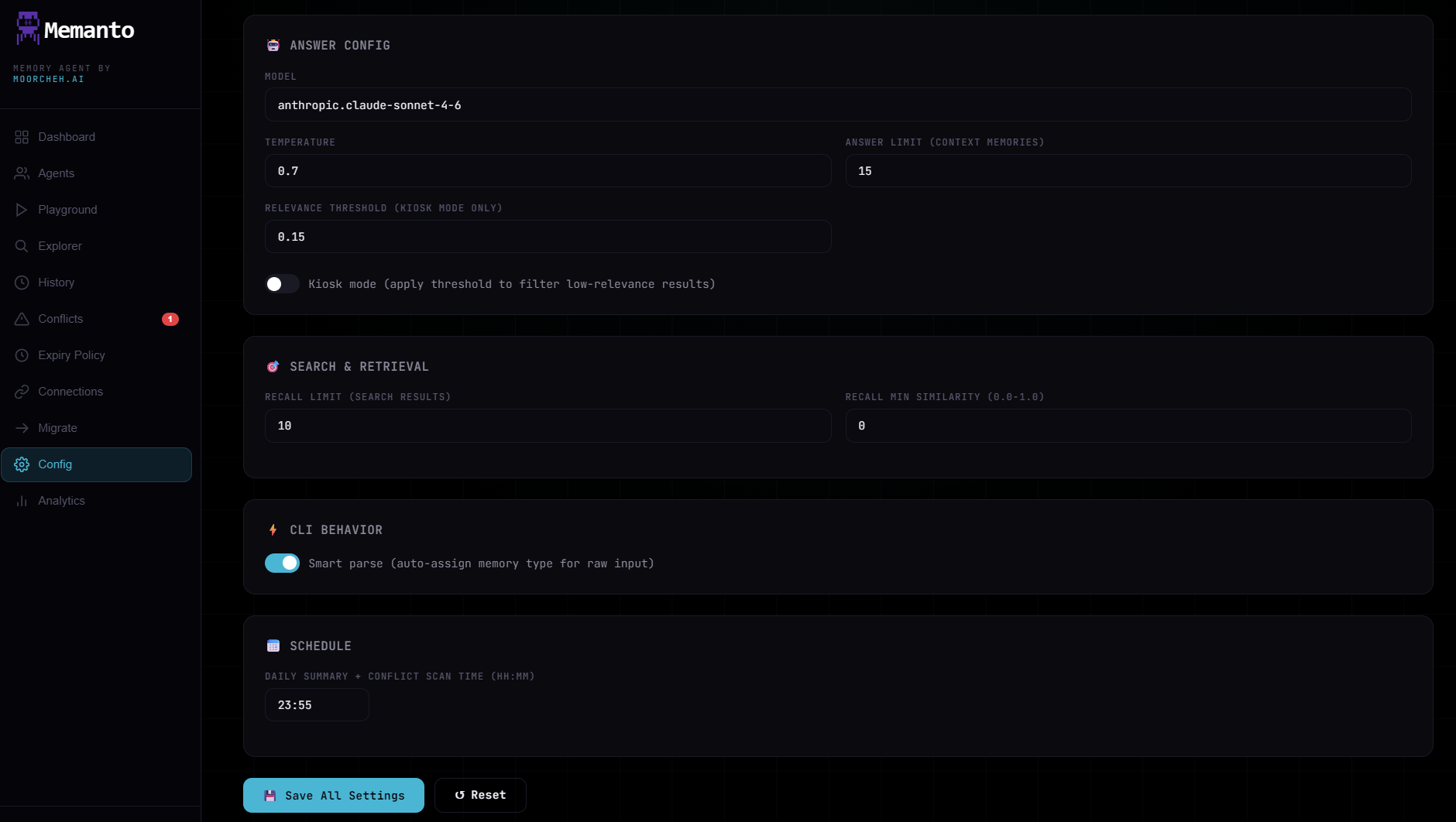
1. **Answer model**: Selects the model used for AI answers. See the [Available Models guide](/cli/ai/answer#available-models).
2. **Temperature**: Controls response creativity and randomness. See the [Temperature guide](/cli/ai/answer#temperature-guide).
3. **Relevance threshold**: Minimum similarity score required for retrieving a memory. See [ITS Scoring](/cli/search/recall#its-scoring) to understand match quality.
4. **Auto-parse**: Automatically parses and extracts unstructured conversational context into structured memory statements during remember operations.
5. **Scheduling**: Time for the daily summary and conflict scan job. To learn what these background jobs do, read [Daily Workflows](/guides/daily-workflows).
