> ## Documentation Index
> Fetch the complete documentation index at: https://docs.memanto.ai/llms.txt
> Use this file to discover all available pages before exploring further.
# On-Prem Overview
> Run Memanto entirely on your own infrastructure with a local Moorcheh server — no API key, no data leaving your environment.
 # Memanto On-Prem
Memanto supports two backends:
* **Cloud** *(default)* — Memanto talks to Moorcheh Cloud over the network with a `MOORCHEH_API_KEY`.
* **On-Prem** — Memanto talks to a local Moorcheh server running in Docker on your own machine or private network. No Moorcheh API key required.
Both backends expose the same CLI, REST API, and SDK behavior. Switching between them is a single command (`memanto config backend on-prem`). Service code never branches on backend — everything in this documentation works identically once you are configured.
## When to Choose On-Prem
| Reason | What on-prem gives you |
| --------------------------- | -------------------------------------------------------------------------------------------------------------------- |
| **Data residency** | Memories and embeddings stay on your hardware. Moorcheh runs in a local Docker container. |
| **Air-gapped environments** | With the `ollama` provider, no outbound calls to OpenAI, Cohere, or Moorcheh are required after initial model pulls. |
| **Cost control** | Zero per-request cost for embeddings, LLM answers, and search when using Ollama. |
| **Compliance** | Useful for HIPAA, SOC 2, and similar regimes that restrict third-party data processors. |
| **Offline development** | Run Memanto locally without internet connectivity. |
Pick **Cloud** instead if you want zero-install, sub-90ms hosted retrieval, and don't need to keep data on-prem. See [Moorcheh Setup & Integration](/guides/moorcheh-integration) for the cloud path.
## Architecture
# Memanto On-Prem
Memanto supports two backends:
* **Cloud** *(default)* — Memanto talks to Moorcheh Cloud over the network with a `MOORCHEH_API_KEY`.
* **On-Prem** — Memanto talks to a local Moorcheh server running in Docker on your own machine or private network. No Moorcheh API key required.
Both backends expose the same CLI, REST API, and SDK behavior. Switching between them is a single command (`memanto config backend on-prem`). Service code never branches on backend — everything in this documentation works identically once you are configured.
## When to Choose On-Prem
| Reason | What on-prem gives you |
| --------------------------- | -------------------------------------------------------------------------------------------------------------------- |
| **Data residency** | Memories and embeddings stay on your hardware. Moorcheh runs in a local Docker container. |
| **Air-gapped environments** | With the `ollama` provider, no outbound calls to OpenAI, Cohere, or Moorcheh are required after initial model pulls. |
| **Cost control** | Zero per-request cost for embeddings, LLM answers, and search when using Ollama. |
| **Compliance** | Useful for HIPAA, SOC 2, and similar regimes that restrict third-party data processors. |
| **Offline development** | Run Memanto locally without internet connectivity. |
Pick **Cloud** instead if you want zero-install, sub-90ms hosted retrieval, and don't need to keep data on-prem. See [Moorcheh Setup & Integration](/guides/moorcheh-integration) for the cloud path.
## Architecture
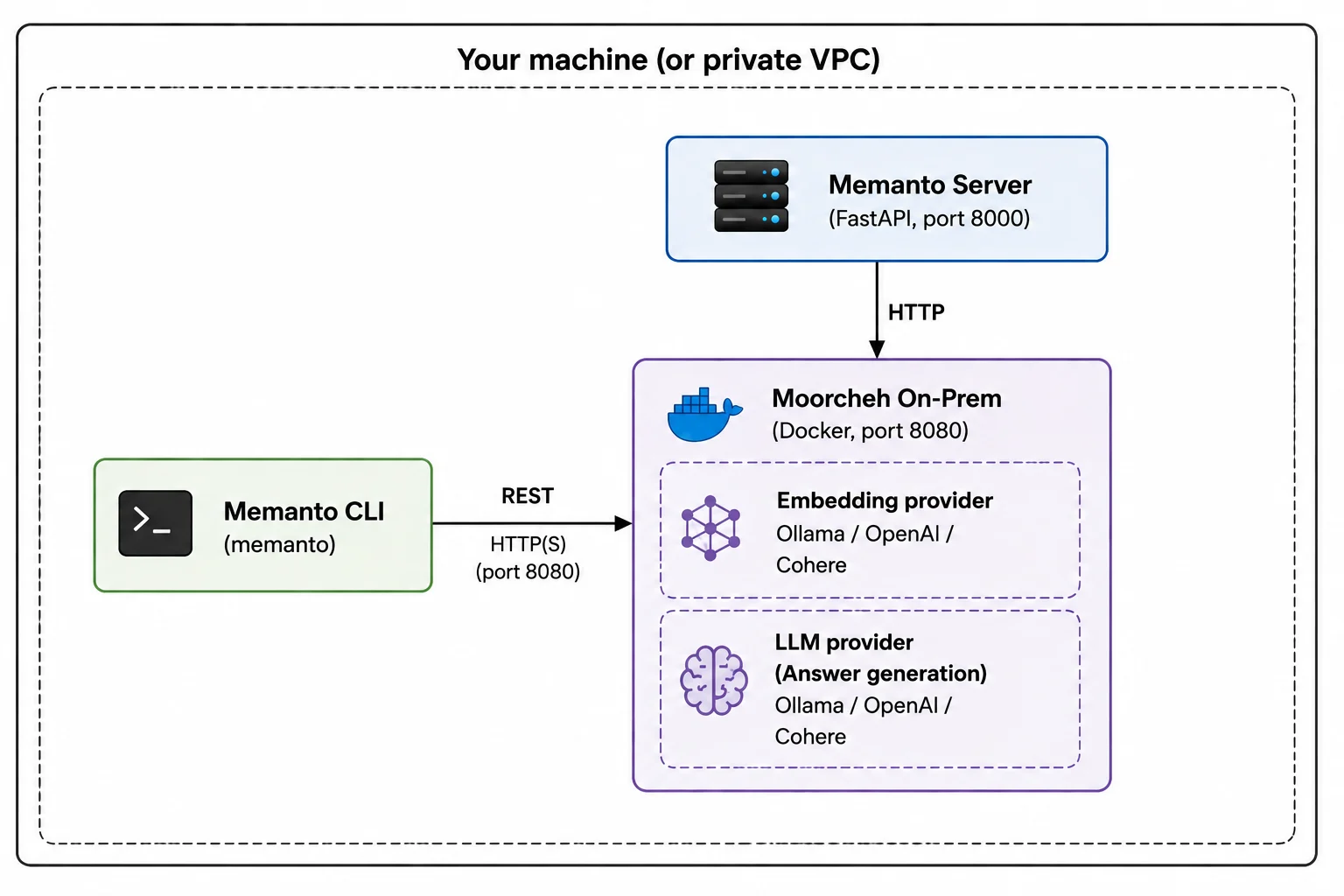 Three components run side-by-side:
1. **Memanto CLI/Server** — the same `memanto` binary you'd use against the cloud. With `MEMANTO_BACKEND=on-prem`, it routes Moorcheh calls to the local server at `http://localhost:8080` instead of the cloud API.
2. **Moorcheh on-prem server** — a containerized build of Moorcheh started by the `moorcheh up` command (shipped with the `moorcheh-client` Python package). Exposes the same `namespaces / documents / similarity_search / answer / files / vectors` resource shape as the cloud SDK.
3. **Embedding + LLM providers** — Ollama (default, runs in a sibling container, zero API keys), or your own OpenAI / Cohere account.
Memanto's service layer never branches on backend, so every feature in the [Guides](/guides/memory-operations), [CLI](/cli/overview), and [API Reference](/api-reference/authentication) sections works the same way on-prem.
## What's Included
Everything available in cloud mode is available on-prem:
* **All 13 typed memory types** — `instruction`, `fact`, `decision`, `goal`, `commitment`, `preference`, `relationship`, `context`, `event`, `learning`, `observation`, `artifact`, `error`. See [Memory Types](/reference/memory-types).
* **`remember` / `recall` / `answer`** — the same three primitives. `answer` uses your locally configured LLM provider instead of the cloud's hosted model.
* **Temporal queries** — `--as-of`, `--changed-since`, `--recent`. See [Temporal Memory](/guides/temporal-memory).
* **Batch ingestion** — up to 100 memories per request.
* **File upload** — `.pdf`, `.docx`, `.xlsx`, `.json`, `.txt`, `.csv`, `.md`. Files are copied into `~/.moorcheh/uploads` and made searchable by the on-prem indexer.
* **Sessions** — same 6-hour JWT session model.
* **Agent management** — create, list, activate, deactivate, bootstrap.
* **Daily summaries, conflict detection, scheduled runs** — `memanto daily-summary`, `memanto conflicts`, `memanto schedule enable`.
* **Web UI** — `memanto ui` works against on-prem the same as cloud.
* **Integrations** — Claude Code, Cursor, Codex, Windsurf, Gemini CLI, Cline, Continue, OpenCode, Goose, Roo, GitHub Copilot, Augment (via `memanto connect`).
* **REST API** — every endpoint under `/api/v2/agents/...` works identically.
The only thing that differs between backends is the underlying retrieval engine — on-prem stores data in Moorcheh's local container; cloud stores it in Moorcheh's hosted service.
## Isolation Guarantees
When you switch to on-prem, Memanto isolates your configuration so cloud and on-prem state never cross-contaminate:
* **Per-backend data directory**: cloud uses `~/.memanto/`, on-prem uses `~/.memanto/on-prem/`. Agents, sessions, and registry entries are separate.
* **Per-backend connection state**: the on-prem server URL, embedding provider, and LLM model live in `~/.memanto/on-prem/state.json`. The cloud's `~/.memanto/config.yaml` is never touched by on-prem onboarding.
* **Per-backend session tokens**: switching backends clears the active session so you don't accidentally send a cloud token to the on-prem server (or vice versa).
This means you can keep both backends configured at once and switch between them with `memanto config backend cloud` / `memanto config backend on-prem`. Your agents on each side remain intact.
## Next Steps
* ** Check requirements** → [Requirements](./requirements)
* ** Install in 5–10 minutes** → [On-Prem Quickstart](./quickstart)
* ** Tune embedding + LLM providers** → [Configuration](./configuration)
* ** Move between cloud and on-prem** → [Backend Switching](./backend-switching)
* ** Run Memanto's REST server in production** → [Self-Hosting Memanto Server](./server-deployment)
* ** Ship to Kubernetes** → [Kubernetes Deployment](./kubernetes)
Three components run side-by-side:
1. **Memanto CLI/Server** — the same `memanto` binary you'd use against the cloud. With `MEMANTO_BACKEND=on-prem`, it routes Moorcheh calls to the local server at `http://localhost:8080` instead of the cloud API.
2. **Moorcheh on-prem server** — a containerized build of Moorcheh started by the `moorcheh up` command (shipped with the `moorcheh-client` Python package). Exposes the same `namespaces / documents / similarity_search / answer / files / vectors` resource shape as the cloud SDK.
3. **Embedding + LLM providers** — Ollama (default, runs in a sibling container, zero API keys), or your own OpenAI / Cohere account.
Memanto's service layer never branches on backend, so every feature in the [Guides](/guides/memory-operations), [CLI](/cli/overview), and [API Reference](/api-reference/authentication) sections works the same way on-prem.
## What's Included
Everything available in cloud mode is available on-prem:
* **All 13 typed memory types** — `instruction`, `fact`, `decision`, `goal`, `commitment`, `preference`, `relationship`, `context`, `event`, `learning`, `observation`, `artifact`, `error`. See [Memory Types](/reference/memory-types).
* **`remember` / `recall` / `answer`** — the same three primitives. `answer` uses your locally configured LLM provider instead of the cloud's hosted model.
* **Temporal queries** — `--as-of`, `--changed-since`, `--recent`. See [Temporal Memory](/guides/temporal-memory).
* **Batch ingestion** — up to 100 memories per request.
* **File upload** — `.pdf`, `.docx`, `.xlsx`, `.json`, `.txt`, `.csv`, `.md`. Files are copied into `~/.moorcheh/uploads` and made searchable by the on-prem indexer.
* **Sessions** — same 6-hour JWT session model.
* **Agent management** — create, list, activate, deactivate, bootstrap.
* **Daily summaries, conflict detection, scheduled runs** — `memanto daily-summary`, `memanto conflicts`, `memanto schedule enable`.
* **Web UI** — `memanto ui` works against on-prem the same as cloud.
* **Integrations** — Claude Code, Cursor, Codex, Windsurf, Gemini CLI, Cline, Continue, OpenCode, Goose, Roo, GitHub Copilot, Augment (via `memanto connect`).
* **REST API** — every endpoint under `/api/v2/agents/...` works identically.
The only thing that differs between backends is the underlying retrieval engine — on-prem stores data in Moorcheh's local container; cloud stores it in Moorcheh's hosted service.
## Isolation Guarantees
When you switch to on-prem, Memanto isolates your configuration so cloud and on-prem state never cross-contaminate:
* **Per-backend data directory**: cloud uses `~/.memanto/`, on-prem uses `~/.memanto/on-prem/`. Agents, sessions, and registry entries are separate.
* **Per-backend connection state**: the on-prem server URL, embedding provider, and LLM model live in `~/.memanto/on-prem/state.json`. The cloud's `~/.memanto/config.yaml` is never touched by on-prem onboarding.
* **Per-backend session tokens**: switching backends clears the active session so you don't accidentally send a cloud token to the on-prem server (or vice versa).
This means you can keep both backends configured at once and switch between them with `memanto config backend cloud` / `memanto config backend on-prem`. Your agents on each side remain intact.
## Next Steps
* ** Check requirements** → [Requirements](./requirements)
* ** Install in 5–10 minutes** → [On-Prem Quickstart](./quickstart)
* ** Tune embedding + LLM providers** → [Configuration](./configuration)
* ** Move between cloud and on-prem** → [Backend Switching](./backend-switching)
* ** Run Memanto's REST server in production** → [Self-Hosting Memanto Server](./server-deployment)
* ** Ship to Kubernetes** → [Kubernetes Deployment](./kubernetes)