> ## Documentation Index
> Fetch the complete documentation index at: https://docs.memanto.ai/llms.txt
> Use this file to discover all available pages before exploring further.
# OpenClaw
> How MemantoClaw integrates with OpenClaw and OpenShell.
 # MemantoClaw
**MemantoClaw** is an open-source reference stack that simplifies running [OpenClaw](https://openclaw.ai/) always-on assistants safely with built-in long-term memory.
It combines three core technologies:
* **Autonomy ([OpenClaw](https://openclaw.ai))**: A powerful open-source agent framework.
* **Security ([NVIDIA OpenShell](https://github.com/NVIDIA/OpenShell))**: A hardened sandbox that restricts network egress and file access.
* **Memory (Memanto)**: A long-term memory architecture powered by Moorcheh that carries context across sessions.
## 🏗️ Architecture
# MemantoClaw
**MemantoClaw** is an open-source reference stack that simplifies running [OpenClaw](https://openclaw.ai/) always-on assistants safely with built-in long-term memory.
It combines three core technologies:
* **Autonomy ([OpenClaw](https://openclaw.ai))**: A powerful open-source agent framework.
* **Security ([NVIDIA OpenShell](https://github.com/NVIDIA/OpenShell))**: A hardened sandbox that restricts network egress and file access.
* **Memory (Memanto)**: A long-term memory architecture powered by Moorcheh that carries context across sessions.
## 🏗️ Architecture
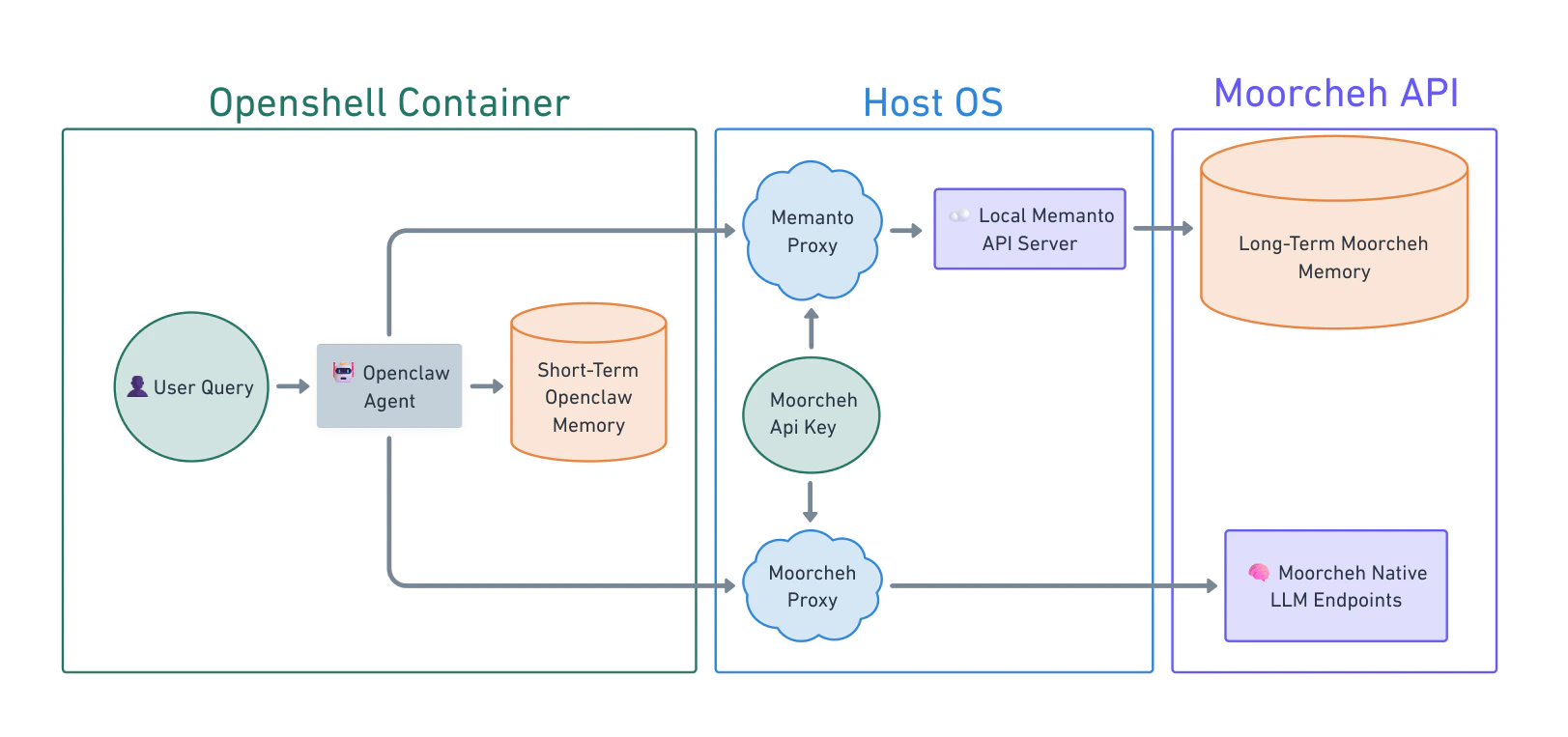 MemantoClaw keeps sensitive host integrations outside the sandbox while preserving a seamless agent experience inside it:
* The **host** manages credentials and provider routing to long-term memory services.
* The **sandbox** runs OpenClaw under OpenShell policy enforcement.
* The agent receives only the context it needs for each task, not raw host credentials or memory databases.
This gives you autonomous workflows with strong controls over network, filesystem, and process behavior.
## The Ecosystem and How the Stack Fits Together
Three pieces usually appear together in a MemantoClaw deployment, each with a distinct scope:
| Project | Scope |
| --------------- | ----------------------------------------------------------------------------------------------------------------------------------------------------------------------- |
| **OpenClaw** | The assistant: runtime, tools, memory, and behavior inside the container. It does not define the sandbox or the host gateway. |
| **OpenShell** | The execution environment: sandbox lifecycle, network, filesystem, and process policy, inference routing, and the operator-facing `openshell` CLI for those primitives. |
| **MemantoClaw** | The reference stack that implements the definition above on the host: CLI and plugin, versioned blueprint, state migration helpers, and Moorcheh memory bridge. |
MemantoClaw sits above OpenShell in the operator workflow. It drives OpenShell APIs and CLI to create and configure the sandbox that runs OpenClaw. Models and endpoints sit behind OpenShell's inference routing. MemantoClaw onboarding wires provider choice into that routing, and inherently injects the Memanto memory bridge.
## MemantoClaw Path versus OpenShell Path
Both paths assume OpenShell can sandbox a workload. The difference is who owns the integration work.
* **MemantoClaw path**: You adopt the reference stack. MemantoClaw's blueprint encodes a hardened image, default policies, Moorcheh integration, and orchestration so `memantoclaw onboard` can provision a validated environment with minimal manual configuration.
* **OpenShell path**: You use OpenShell as the platform and supply your own container, install steps, policy YAML, provider setup, and any host bridges.
### What MemantoClaw Adds Beyond the OpenShell Community Sandbox
| Capability | `openshell sandbox create --from openclaw` | `memantoclaw onboard` |
| ----------------------- | --------------------------------------------------------------------- | -------------------------------------------------------------------------- |
| **Sandbox isolation** | Yes. OpenShell applies seccomp filters, Landlock, privilege dropping. | Yes. MemantoClaw applies these and layers a more restrictive policy. |
| **Credential handling** | You create providers manually. | Creates providers automatically and filters sensitive host env vars. |
| **Image hardening** | Standard system tools included. | Strips build toolchains (`gcc`, `make`) and network probes (`netcat`). |
| **Filesystem policy** | Bundled policy for OpenClaw. | More restrictive read-only/read-write layout. Gateway config is immutable. |
| **Inference setup** | Manual configuration. | Wizard validates credentials, configures routing automatically. |
| **Memory integration** | Manual vector DB provisioning required. | **Zero-config Memanto integration via Moorcheh**. |
## The Memanto Advantage
### Unified API Key for Memory and Inference
MemantoClaw simplifies credential management by bundling both long-term memory access and native LLM inference into a **single API key**.
Instead of juggling separate keys for your vector database (or Moorcheh memory service) and your LLM inference provider, your Moorcheh API key authenticates both. When you run `memantoclaw onboard`, you provide this one key, and MemantoClaw automatically configures the OpenShell inference gateway to proxy your LLM requests while simultaneously enabling the zero-config memory bridge.
### Secure and Real-time Memory
By leveraging Moorcheh's infrastructure, the Memanto memory layer offers zero-wait ingestion (no indexing delays) and a secure host-bridge architecture where memory stays safely on Moorcheh, and the sandbox only receives specific retrieved context.
## Deep Dive: How It Works
MemantoClaw keeps sensitive host integrations outside the sandbox while preserving a seamless agent experience inside it:
* The **host** manages credentials and provider routing to long-term memory services.
* The **sandbox** runs OpenClaw under OpenShell policy enforcement.
* The agent receives only the context it needs for each task, not raw host credentials or memory databases.
This gives you autonomous workflows with strong controls over network, filesystem, and process behavior.
## The Ecosystem and How the Stack Fits Together
Three pieces usually appear together in a MemantoClaw deployment, each with a distinct scope:
| Project | Scope |
| --------------- | ----------------------------------------------------------------------------------------------------------------------------------------------------------------------- |
| **OpenClaw** | The assistant: runtime, tools, memory, and behavior inside the container. It does not define the sandbox or the host gateway. |
| **OpenShell** | The execution environment: sandbox lifecycle, network, filesystem, and process policy, inference routing, and the operator-facing `openshell` CLI for those primitives. |
| **MemantoClaw** | The reference stack that implements the definition above on the host: CLI and plugin, versioned blueprint, state migration helpers, and Moorcheh memory bridge. |
MemantoClaw sits above OpenShell in the operator workflow. It drives OpenShell APIs and CLI to create and configure the sandbox that runs OpenClaw. Models and endpoints sit behind OpenShell's inference routing. MemantoClaw onboarding wires provider choice into that routing, and inherently injects the Memanto memory bridge.
## MemantoClaw Path versus OpenShell Path
Both paths assume OpenShell can sandbox a workload. The difference is who owns the integration work.
* **MemantoClaw path**: You adopt the reference stack. MemantoClaw's blueprint encodes a hardened image, default policies, Moorcheh integration, and orchestration so `memantoclaw onboard` can provision a validated environment with minimal manual configuration.
* **OpenShell path**: You use OpenShell as the platform and supply your own container, install steps, policy YAML, provider setup, and any host bridges.
### What MemantoClaw Adds Beyond the OpenShell Community Sandbox
| Capability | `openshell sandbox create --from openclaw` | `memantoclaw onboard` |
| ----------------------- | --------------------------------------------------------------------- | -------------------------------------------------------------------------- |
| **Sandbox isolation** | Yes. OpenShell applies seccomp filters, Landlock, privilege dropping. | Yes. MemantoClaw applies these and layers a more restrictive policy. |
| **Credential handling** | You create providers manually. | Creates providers automatically and filters sensitive host env vars. |
| **Image hardening** | Standard system tools included. | Strips build toolchains (`gcc`, `make`) and network probes (`netcat`). |
| **Filesystem policy** | Bundled policy for OpenClaw. | More restrictive read-only/read-write layout. Gateway config is immutable. |
| **Inference setup** | Manual configuration. | Wizard validates credentials, configures routing automatically. |
| **Memory integration** | Manual vector DB provisioning required. | **Zero-config Memanto integration via Moorcheh**. |
## The Memanto Advantage
### Unified API Key for Memory and Inference
MemantoClaw simplifies credential management by bundling both long-term memory access and native LLM inference into a **single API key**.
Instead of juggling separate keys for your vector database (or Moorcheh memory service) and your LLM inference provider, your Moorcheh API key authenticates both. When you run `memantoclaw onboard`, you provide this one key, and MemantoClaw automatically configures the OpenShell inference gateway to proxy your LLM requests while simultaneously enabling the zero-config memory bridge.
### Secure and Real-time Memory
By leveraging Moorcheh's infrastructure, the Memanto memory layer offers zero-wait ingestion (no indexing delays) and a secure host-bridge architecture where memory stays safely on Moorcheh, and the sandbox only receives specific retrieved context.
## Deep Dive: How It Works
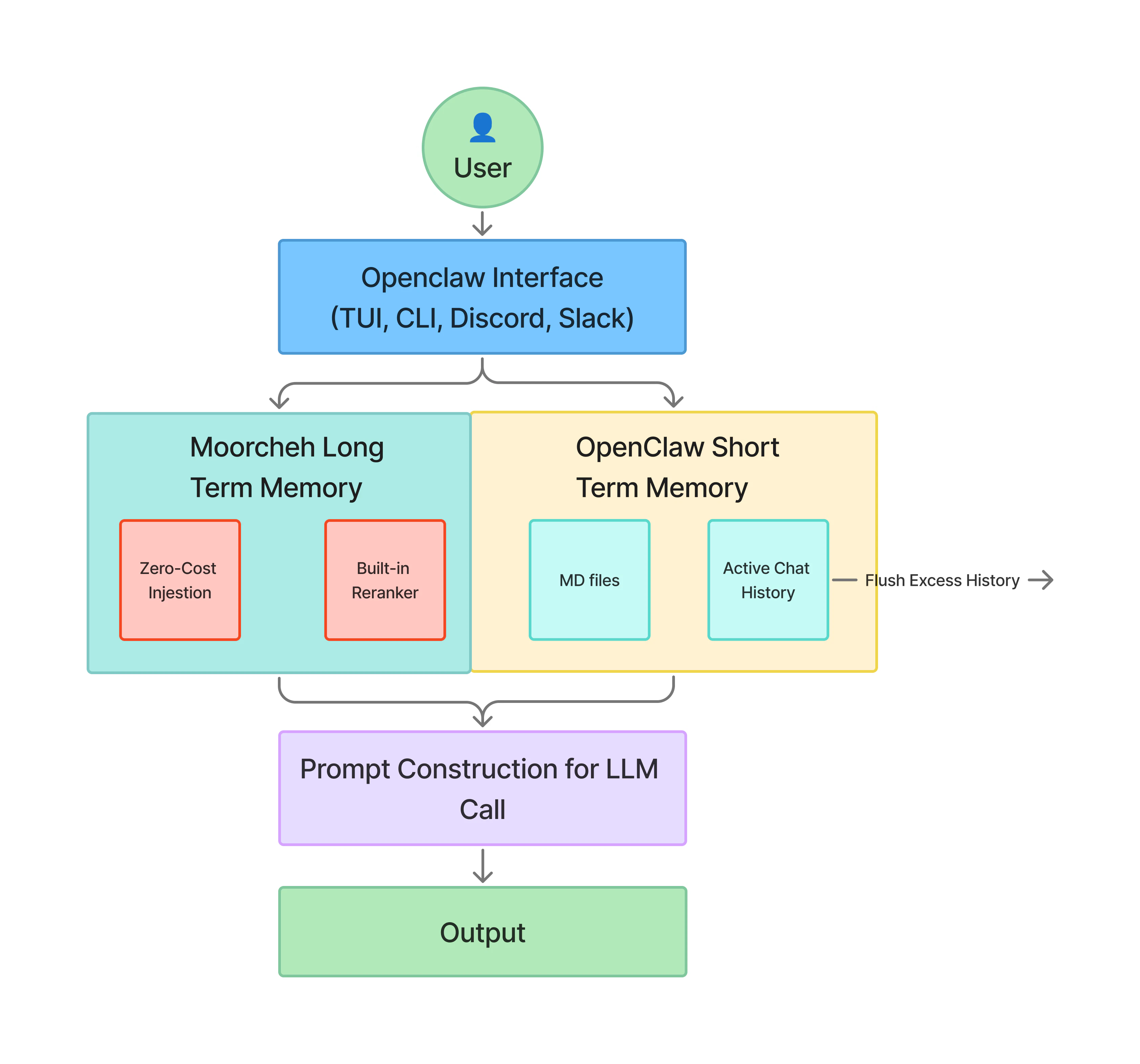 At a high level, MemantoClaw handles each request inside the OpenShell container by letting OpenClaw process the query, work with short-term context, and route memory and model calls through dedicated host-aware proxies. One path connects to Memanto for durable long-term memory, while the other handles inference through Moorcheh-native endpoints.
That routing pattern is what keeps credentials and external integrations on the host side, while the agent runtime remains isolated in the sandbox.
At a high level, MemantoClaw handles each request inside the OpenShell container by letting OpenClaw process the query, work with short-term context, and route memory and model calls through dedicated host-aware proxies. One path connects to Memanto for durable long-term memory, while the other handles inference through Moorcheh-native endpoints.
That routing pattern is what keeps credentials and external integrations on the host side, while the agent runtime remains isolated in the sandbox.
*For complete, unabridged technical details on this topic, refer to the official [NVIDIA NemoClaw Documentation](https://docs.nvidia.com/nemoclaw/latest/about/overview.html). Portions of this guide are summarized and adapted from NVIDIA Corporation (Copyright © 2026), licensed under the Apache License, Version 2.0.*
## Quickstart & Windows Setup
MemantoClaw provides a CLI to launch and manage a sandboxed OpenClaw instance easily.
### Prerequisites
* A valid `MOORCHEH_API_KEY`.
* Docker installed and running on your system.
### Windows Prerequisites
Running MemantoClaw on Windows requires WSL 2 (Windows Subsystem for Linux).
1. **Enable WSL 2**: Open an elevated PowerShell and run `wsl --install --no-distribution`. Reboot if prompted.
2. **Install Ubuntu**: Open an elevated PowerShell and run `wsl --install -d Ubuntu`. Let it finish first-run setup.
3. **Install Docker Desktop**: Install Docker Desktop with the WSL 2 backend. Confirm WSL integration is enabled for your Ubuntu distribution.
4. **Local Ollama (Optional)**: If using Ollama, install it inside WSL: `curl -fsSL https://ollama.com/install.sh | sh`.
### Installation
Install the CLI using the installer script (run this in your WSL/Linux terminal):
```bash theme={null}
curl -fsSL https://raw.githubusercontent.com/moorcheh-ai/memantoclaw/refs/heads/main/install.sh | bash
```
### Launching the Sandbox
Start the interactive onboarding wizard to configure your sandbox. The wizard will prompt you to select your inference provider and securely enter your `MOORCHEH_API_KEY`.
```bash theme={null}
memantoclaw onboard
```
> **Note**: For MemantoClaw-managed environments, always use `memantoclaw onboard` when you need to create or recreate the OpenShell gateway or sandbox. Avoid using raw `openshell` commands for these lifecycle events.
### Deploy to a Remote GPU Instance
You can deploy MemantoClaw to a remote GPU instance (e.g., Brev, AWS).
The preferred path is to provision the VM, run the standard installer on that host, and then run `memantoclaw onboard`.
*For complete, unabridged technical details on this topic, refer to the official [NVIDIA NemoClaw Documentation](https://docs.nvidia.com/nemoclaw/latest/get-started/quickstart.html). Portions of this guide are summarized and adapted from NVIDIA Corporation (Copyright © 2026), licensed under the Apache License, Version 2.0.*
## Inference Options
MemantoClaw supports multiple inference providers. During onboarding, the `memantoclaw onboard` wizard presents a list of providers to choose from. Your selection determines where the agent's inference traffic is routed.
### How Inference Routing Works
The agent inside the sandbox talks to `inference.local`. It never connects to a provider directly. OpenShell intercepts inference traffic on the host and forwards it to the provider you selected. Provider credentials stay entirely on the host.
#### Provider Options
| Provider | Description |
| ----------------------------- | ------------------------------------------------------------------------------------------- |
| **Moorcheh Routed Inference** | The native MemantoClaw experience. Routes inference directly using your `MOORCHEH_API_KEY`. |
| **NVIDIA Endpoints** | Routes to models hosted on build.nvidia.com. (e.g., Nemotron 3 Super) |
| **OpenAI** | Routes to the OpenAI API. |
| **Anthropic** | Routes to the Anthropic Messages API. |
| **Google Gemini** | Routes to Google's OpenAI-compatible endpoint. |
### Switching Inference Models at Runtime
You can change the active inference model while the sandbox is running. No restart is required. Switching happens through the OpenShell inference route.
```bash theme={null}
## Example for NVIDIA Endpoints
openshell inference set --provider nvidia-prod --model nvidia/nemotron-3-super-120b-a12b
## Example for OpenAI
openshell inference set --provider openai-api --model gpt-5.4
## Example for Anthropic
openshell inference set --provider anthropic-prod --model claude-sonnet-4-6
```
#### Cross-Provider Switching
Switching to a different provider family requires updating both the gateway route and the sandbox config.
```bash theme={null}
openshell inference set --provider anthropic-prod --model claude-sonnet-4-6 --no-verify
export MEMANTOCLAW_MODEL_OVERRIDE="anthropic/claude-sonnet-4-6"
export MEMANTOCLAW_INFERENCE_API_OVERRIDE="anthropic-messages"
memantoclaw onboard --resume --recreate-sandbox
```
### Using a Local Inference Server
MemantoClaw can route inference to a model server running on your machine.
#### Ollama
Ollama is the default local option. The wizard detects it automatically. On Linux with Docker, the sandbox reaches Ollama through `http://host.openshell.internal:11434`. Make sure Ollama listens on `0.0.0.0:11434`.
#### OpenAI/Anthropic Compatible Servers
Works with vLLM, TensorRT-LLM, llama.cpp, LocalAI, etc. Select "Other OpenAI-compatible endpoint" and enter your base URL (e.g., `http://localhost:8000/v1`). The wizard will probe `/v1/responses` and fall back to `/v1/chat/completions` if streaming events are incompatible.
#### Experimental Local vLLM & NVIDIA NIM
Set `MEMANTOCLAW_EXPERIMENTAL=1` to enable vLLM auto-detection on `localhost:8000` or NIM container management on hosts with NIM-capable NVIDIA GPUs.
```bash theme={null}
MEMANTOCLAW_EXPERIMENTAL=1 memantoclaw onboard
```
#### Timeout Configuration
Local inference requests use a default timeout of 180 seconds. Increase it if needed:
```bash theme={null}
export MEMANTOCLAW_LOCAL_INFERENCE_TIMEOUT=300
memantoclaw onboard
```
*For complete, unabridged technical details on this topic, refer to the official [NVIDIA NemoClaw Documentation](https://docs.nvidia.com/nemoclaw/latest/inference/inference-options.html). Portions of this guide are summarized and adapted from NVIDIA Corporation (Copyright © 2026), licensed under the Apache License, Version 2.0.*
## Network Policies
MemantoClaw runs with a deny-by-default network policy. The sandbox can only reach endpoints that are explicitly allowed. Any request to an unlisted destination is intercepted by OpenShell.
### Baseline Policy
The baseline policy is defined in `memantoclaw-blueprint/policies/openclaw-sandbox.yaml`.
* **Filesystem**: `/sandbox`, `/tmp`, `/dev/null` are Read-write. `/usr`, `/lib`, `/proc`, `/app`, `/etc` are Read-only.
* **Network**: Endpoints like `openclaw.ai:443`, `docs.openclaw.ai:443`, `registry.npmjs.org:443` are allowed.
* **Inference**: The baseline policy allows only the `local` inference route.
*Note: GitHub access is included by default, alongside Memanto and Moorcheh API access.*
### Operator Approval Flow
When the agent attempts to reach an unlisted endpoint, OpenShell intercepts the request interactively.
1. Open the TUI: `openshell term`
2. Trigger a blocked request (the agent tries to reach an unknown host).
3. The TUI displays the Host, Port, Binary, and HTTP method of the request.
4. **Approve** to add the endpoint for the current session, or **Deny** to keep it blocked.
Approved endpoints persist for the current session but are not saved to the baseline policy file.
### Customize the Sandbox Network Policy
#### Static Changes
Edit `memantoclaw-blueprint/policies/openclaw-sandbox.yaml`. Each entry defines `endpoints`, `binaries`, and `rules` (methods). Then re-run:
```bash theme={null}
memantoclaw onboard
```
#### Dynamic Changes
Create a YAML policy file and apply it to a running sandbox instantly:
```bash theme={null}
openshell policy set
```
#### Policy Presets
MemantoClaw ships preset policy files for common integrations (e.g., `github`, `npm`, `pypi`, `discord`, `slack`). To apply a preset to a running sandbox:
```bash theme={null}
openshell policy set memantoclaw-blueprint/policies/presets/pypi.yaml
```
*For complete, unabridged technical details on this topic, refer to the official [NVIDIA NemoClaw Documentation](https://docs.nvidia.com/nemoclaw/latest/reference/network-policies.html). Portions of this guide are summarized and adapted from NVIDIA Corporation (Copyright © 2026), licensed under the Apache License, Version 2.0.*
## Workspace Files
Workspace files define your agent's personality, memory, and user context. They persist across sandbox restarts but are permanently deleted when you run `memantoclaw destroy`.
These files live at `/sandbox/.openclaw/workspace/` inside the sandbox.
### File Reference
| File | Description |
| ------------- | -------------------------------------------------------------------- |
| `SOUL.md` | Core personality, tone, and behavioral rules. |
| `USER.md` | Preferences, context, and facts the agent learns about you. |
| `IDENTITY.md` | Agent name, creature type, emoji, and self-presentation. |
| `AGENTS.md` | Multi-agent coordination, memory conventions, and safety guidelines. |
### The Memanto Advantage
In standard open-source setups, OpenClaw relies on a local SQLite database for recent chat history (using BM25 keyword matching) and manual markdown files like `MEMORY.md` for facts. This approach is lossy, degrades over time, and if the sandbox is destroyed, the agent suffers total amnesia of its conversational context.
With **MemantoClaw**, long-term semantic memory is securely routed to Moorcheh's information-theoretic search engine via the host bridge. Even if you destroy the sandbox, the retrieved context and learned knowledge safely persist remotely, ready to be injected into your next agent immediately.
### Back Up and Restore Workspace Files
Use the OpenShell CLI to manually copy local Markdown files out of the sandbox before destroying it:
```bash theme={null}
SANDBOX=my-assistant
BACKUP_DIR=~/.memantoclaw/backups/$(date +%Y%m%d-%H%M%S)
mkdir -p "$BACKUP_DIR"
openshell sandbox download "$SANDBOX" /sandbox/.openclaw/workspace/SOUL.md "$BACKUP_DIR/"
openshell sandbox download "$SANDBOX" /sandbox/.openclaw/workspace/USER.md "$BACKUP_DIR/"
```
To restore:
```bash theme={null}
openshell sandbox upload "$SANDBOX" "$BACKUP_DIR/SOUL.md" /sandbox/.openclaw/workspace/
```
#### Using the Backup Script
MemantoClaw includes a convenience script:
```bash theme={null}
./scripts/backup-workspace.sh backup my-assistant
./scripts/backup-workspace.sh restore my-assistant
```
*For complete, unabridged technical details on this topic, refer to the official [NVIDIA NemoClaw Documentation](https://docs.nvidia.com/nemoclaw/latest/workspace/workspace-files.html). Portions of this guide are summarized and adapted from NVIDIA Corporation (Copyright © 2026), licensed under the Apache License, Version 2.0.*
## Security Best Practices
MemantoClaw enforces security at four layers: Network, Filesystem, Process, and Inference.
### Layer Protections
* **Network Layer**: Deny-by-default egress. Configured via OpenShell policy. Binary-Scoped rules ensure only authorized binaries (like `gh` or `git`) can access specific endpoints.
* **Filesystem Layer**: Uses Landlock LSM + container mounts. `/sandbox` is read-only, while specific paths like `/sandbox/.openclaw-data` and `/tmp` are writable. Gateway config (`/sandbox/.openclaw`) is immutable and hash-pinned.
* **Process Layer**: Drops dangerous Linux capabilities using `capsh`. Sets `ulimit -u 512` to mitigate fork-bomb attacks. Enforces `no-new-privileges` to block privilege escalation via setuid binaries. Removes build toolchains (`gcc`, `make`) and `netcat` from the image.
* **Inference Layer**: Routes model API calls to controlled backends via `inference.local`.
### Credential Storage
Credentials (like `MOORCHEH_API_KEY`, `OPENAI_API_KEY`) are stored in plaintext JSON at:
`~/.memantoclaw/credentials.json`
They are created with mode `0600` on the host. **They are never injected into the sandbox.** The host bridge authenticates requests before forwarding them. If you suspect exposure, rotate keys and remove the stored file:
```bash theme={null}
rm -f ~/.memantoclaw/credentials.json
```
### OpenClaw Controls
MemantoClaw delegates application-layer security to OpenClaw. OpenClaw provides:
* **Prompt Injection Detection**: Neutralizes attempts like `` tag spoofing.
* **Tool Access Control**: High-risk tools (`exec`, `spawn`, `fs_write`) are gated by a multi-layer policy pipeline.
* **Environment Variable Security**: Blocks dangerous env vars (`NODE_OPTIONS`, `LD_PRELOAD`).
* **Secret Scanner**: Intercepts writes targeting memory paths that look like API keys before they reach the disk.
*For complete, unabridged technical details on this topic, refer to the official [NVIDIA NemoClaw Documentation](https://docs.nvidia.com/nemoclaw/latest/security/best-practices.html). Portions of this guide are summarized and adapted from NVIDIA Corporation (Copyright © 2026), licensed under the Apache License, Version 2.0.*
## Operations and Troubleshooting
Use the MemantoClaw status, logs, and TUI tools together to inspect sandbox health and trace agent behavior.
### Monitor Sandbox Activity
#### Check Health
```bash theme={null}
memantoclaw status
```
This probes the gateway health, process health, and tests local Ollama/vLLM routes directly.
#### View Logs
```bash theme={null}
memantoclaw logs --follow
```
#### Open TUI
```bash theme={null}
openshell term
```
Use this to view active network connections and approve/deny blocked egress requests.
### Troubleshooting Common Issues
* **Installer fails on Node.js**: MemantoClaw requires Node.js 22.16+. Install it using `nvm use 22`.
* **Docker permission denied**: Ensure your user is in the `docker` group (`sudo usermod -aG docker $USER`).
* **OOM errors during sandbox creation**: Image push requires memory. Add at least 8 GB of swap file on smaller machines.
* **Port already in use**: The gateway uses port `18789`. Terminate conflicting processes (`sudo lsof -i :18789`).
* **Sandbox lost after gateway restart**: Upgrade OpenShell to >= 0.0.24 via `memantoclaw onboard`.
* **Inference unreachable**: Check if Ollama/vLLM is running. Increase timeout (`MEMANTOCLAW_LOCAL_INFERENCE_TIMEOUT=300`) for slow hardware.
Generate a debug tarball for support if needed:
```bash theme={null}
memantoclaw debug
```
### Agent Skills for AI Coding Assistants
MemantoClaw ships agent skills generated directly from documentation. These allow coding assistants (like Cursor, Claude Code) to read project-specific guidance.
Fetch the skills via sparse checkout:
```bash theme={null}
git clone --filter=blob:none --no-checkout https://github.com/moorcheh-ai/memantoclaw.git
cd memantoclaw
git sparse-checkout set --no-cone '/.agents/skills/**'
git checkout
```
Open the directory in your assistant to give it deep context on managing your sandbox.
*For complete, unabridged technical details on this topic, refer to the official [NVIDIA NemoClaw Documentation](https://docs.nvidia.com/nemoclaw/latest/monitoring/monitor-sandbox-activity.html). Portions of this guide are summarized and adapted from NVIDIA Corporation (Copyright © 2026), licensed under the Apache License, Version 2.0.*
## Commands
The `memantoclaw` CLI handles host-side operations outside the OpenClaw plugin context.
### Standalone Host Commands
| Command | Description | Notes |
| ------------------------------------- | ------------------------------------------------------------------------------------------------------------------- | -------------------------------------------------------------------------- |
| `memantoclaw onboard` | Run the interactive setup wizard. Creates gateway, registers providers, builds the image, and launches the sandbox. | `memantoclaw onboard [--non-interactive] [--resume] [--from ]` |
| `memantoclaw list` | List all registered sandboxes with their model, provider, and policy presets. | |
| `memantoclaw connect` | Connect to a sandbox by name. Drops you into the sandbox shell where you can run `openclaw tui`. | |
| `memantoclaw status` | Show sandbox status, health, and inference configuration. | Probes local inference backends to report `healthy` or `unreachable`. |
| `memantoclaw logs` | View sandbox logs. | Use `--follow` to stream output in real time. |
| `memantoclaw destroy` | Stop the NIM container and delete the sandbox permanently. | Back up workspace files first. |
| `memantoclaw policy-add` | Add a policy preset to a sandbox (e.g., `github`, `npm`). | Use `--dry-run` to preview the endpoints it would open. |
| `memantoclaw policy-list` | List available policy presets and show which ones are applied. | |
| `openshell term` | Open the OpenShell TUI to monitor sandbox activity and approve network requests. | |
| `memantoclaw start` / `stop` | Start or stop optional host auxiliary services (like the cloudflared tunnel). | |
| `memantoclaw debug` | Collect diagnostics (system info, Docker state, logs) for bug reports into a tarball. | |
| `memantoclaw credentials list` | List stored credential names. | Values are not printed. |
| `memantoclaw credentials reset ` | Remove a stored credential by name. | Forces a re-prompt on the next onboard. |
| `memantoclaw uninstall` | Run `uninstall.sh` to remove sandboxes, gateway resources, and local state. | `memantoclaw uninstall [--yes] [--keep-openshell] [--delete-models]` |
*For complete, unabridged technical details on this topic, refer to the official [NVIDIA NemoClaw Documentation](https://docs.nvidia.com/nemoclaw/latest/reference/commands.html). Portions of this guide are summarized and adapted from NVIDIA Corporation (Copyright © 2026), licensed under the Apache License, Version 2.0.*